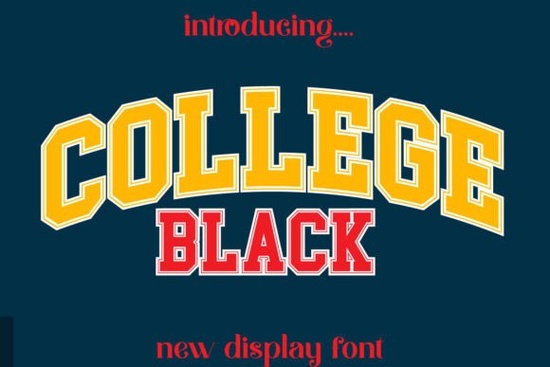
Finding the right display font for team merch, sports branding, or loud headlines often means choosing something that feels strong, modern, and easy to read at a glance. College Black Font is a bold display typeface that picks up classic college and varsity lettering but strips it back into cleaner, more current shapes. Whether you’re designing a jersey, a poster, a game cover, or a logo that needs instant presence, this font delivers the right tone without feeling dated.
Who should use a bold college-style font like this?
Designers, print‑on‑demand sellers, and small businesses who work on sports apparel, team kits, or fan merchandise will get the most out of it. The blunt, slightly geometric letterforms stand out on shirts, hoodies, and caps, especially when you need a single word or short phrase to carry the whole design.
Crafters and hobbyists can use it for custom gifts, scrapbook titles, or event banners. Because the font reads well at large sizes, it also works on book covers, YouTube thumbnails, cinema posters, and magazine‑style headlines. The core crowd, however, is anyone who wants that competitive, locker‑room energy without going full‑on distressed or cartoonish.
What makes this display font different from standard college fonts?
Many “college” fonts lean heavily on serifs, outlines, and shadow effects. College Black Font keeps things more direct. The characters are solid, uniform in stroke, and built to sit cleanly on a baseline. That means you can pair it with modern sans‑serifs or even a delicate script without visual clutter. The font’s modern edge also makes it suitable for film posters, documentary titles, and gaming logos where you need authority but still want to feel current.
It’s not limited to red‑and‑white color schemes or generic sports vibes. You can push it into industrial, editorial, or streetwear designs simply by adjusting the color palette and background texture.
Which projects work best with a sporty display font?
- Team and league branding: jersey names, numbers, warm‑up shirts, and sideline gear.
- Movie and documentary titles: especially for action, crime, or coming‑of‑age stories.
- Posters and flyers: gym promotions, college events, music gigs.
- Logos: esports teams, coffee shops with an athletic vibe, or streetwear brands.
- Book covers: young‑adult fiction, sports biographies, graphic novels.
- Game UI: racing titles, fighting games, or anything with a competitive angle.
If you’re working on a holiday‑themed event, you might mix in a friendlier feel with a font like a welcoming Christmas display. For tropical summer campaigns, a Laguna Tropic style could add the warmth that a stark college font lacks. In each case, the pairing keeps the message readable while matching the season.
How to pair College Black Font with other typefaces
A bold display face rarely stands alone. You almost always need a secondary font for body copy, small print, or supporting details. Try these combinations:
- Clean geometric sans: use for names, dates, or legal text. Keeps the overall look crisp.
- Thin, high‑contrast serif: adds a hint of elegance for magazine spreads or premium packaging.
- Hand‑drawn or retro script: if you want a human touch behind the bold headline.
- Monospaced or tech fonts: pushes the design toward futuristic gaming or sci‑fi posters.
Avoid pairing it with another ultra‑bold display face, especially one that also has blocky proportions. Two loud voices will fight for attention. Let College Black Font do the heavy lifting, and keep the supporting cast quieter.
What should you watch out for when using heavy display fonts?
At small sizes, thick letterforms can close up and become hard to read. Test your layout at the smallest size it will appear if it’s a shirt number, check the print from arm’s length. When used on light garments, a thin outline or a subtle drop shadow can keep the letters from blending into the fabric if the print method isn’t perfectly opaque.
Also, check the character set before you commit. Most projects need basic punctuation and maybe a few accented characters. College Black Font covers the standard Latin set, but if you need extended language support, verify the glyph map on the product page.
How does this fit with Creative Fabrica’s license model?
The font is available as part of the Creative Fabrica subscription, which includes full commercial use. You can create physical and digital products for sale, use it in branding, and embed it in designs for print‑on‑demand all within a single, straightforward license. There’s no need to track monthly sales or pay extra royalties, which keeps things simple for small business owners and consistent creators.
When should you explore other display styles?
Sometimes a polished, straight‑edged college font isn’t the right texture. If your design needs a worn‑in, tactile feel, you might look at chunky texture fonts that add roughness and grit. For an old‑school railway or travel poster mood, a departure board inspired typeface brings a completely different atmosphere while still being a bold display face.
The key is to match the font’s personality to the story your design tells. College Black Font says strength, competition, and modern confidence not nostalgia or softness.
A quick checklist before you start your project
- Download the font and test it at the largest and smallest sizes your design needs.
- Check the character map for any missing punctuation, currency symbols, or accents.
- Pair it with one quiet secondary font (sans‑serif, thin serif, or monospaced).
- Consider color contrast: solid white on dark backgrounds often pops best for sports gear.
- If using for print‑on‑demand, preview on the actual product mockup to see how the thick strokes behave.
- Always keep the license handy; Creative Fabrica’s POD‑friendly terms cover most standard uses.
Next step: open your design tool, drop in a short title in College Black Font, and try it with a few different background textures. That fast test will tell you whether the vibe hits right before you build out the full layout.
Learn More Retro Script Fonts: Add Classic Charm to Your Designs
 Inspire Creativity with Stunning Designer Fonts
 Welcome Christmas Font: Festive Typography & Design
 Grinched 2.0 Font: Playful Typography for Creative Projects
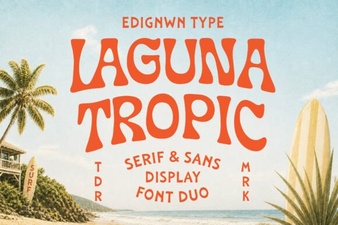 Laguna Tropic Font: Project Ideas & Design Inspiration
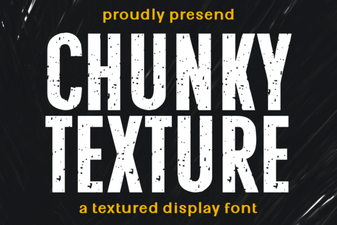 Bold Chunky Texture Fonts for Creative Design Projects